POLOTOTO MAIN GAME ONLINE Tampil sebagai solusi inovatif dalam dunia hiburan digital, POLOTOTO Main Game Online x Teradata Joins - Teradata Point menawarkan berbagai keunggulan yang tidak bisa diabaikan. Kolaborasi ini menghadirkan platform game online yang mengutamakan keamanan dan kenyamanan pengguna. Dengan akses yang aman dan layanan pelanggan 24 jam, pengguna dapat menikmati game online PC dan game online lainnya tanpa khawatir. Keandalan sistem yang didukung oleh "Teradata Joins - Teradata Point" ini menjamin pengalaman bermain yang lebih lancar dan menyenangkan.
Sebagai situs resmi, POLOTOTO MAIN GAME ONLINE menghadirkan beragam fitur unggulan yang dirancang khusus untuk para penggemar game online. Dari metode pembayaran yang mudah dan aman hingga bonus menarik yang bisa meningkatkan peluang maxwin, semuanya dirancang untuk memaksimalkan kepuasan pengguna. Platform ini tidak hanya mendukung berbagai game online PC, tetapi juga memastikan bahwa setiap permainan berjalan adil dengan sistem yang transparan. Dengan adanya "Teradata Joins - Teradata Point", pemain dapat merasakan manfaat tambahan yang membuat pengalaman bermain semakin menarik.
Pengalaman bermain di POLOTOTO Main Game Online sangatlah mengesankan, terutama dengan dukungan teknologi canggih dari "Teradata Joins - Teradata Point". Para pemain dapat memanfaatkan tips dan strategi singkat yang tersedia untuk meningkatkan peluang menang dalam berbagai game online. Dengan RTP yang kompetitif dan sistem fair play yang dijamin, setiap sesi bermain menjadi lebih menantang dan adil. Ayo, eksplorasi lebih lanjut dunia game online bersama POLOTOTO MAIN GAME ONLINE dan temukan keseruan yang tiada habisnya!
Joins mean joining more than one table based on the common columns/values from these tables. Joins are helpful to get meaningful data for business queries.
Teradata supports different kinds of join as below.
- Inner Join.
- Left Outer Join.
- Right Outer Join.
- Full Outer Join.
- Self Join.
- Cross Join.
- Cartesian Production Join.
Inner Join
Inner Join combines records from more than one table and returns the values that exist in both the tables.
Inner Join Syntax
The syntax for Inner join is as follows.
Select column1, column2, ...., columnN
from DatabaseName.TableName1
INNER JOIN
Databasename.TableName2
on column1=column2
where condition;
Inner Join Example
Consider the following employee and department table.
Employee Table
| empno |
ename |
dob |
job |
mgr |
hiredate |
sal |
deptno |
| 1 |
SMITH |
24-02-1988 |
CLERK |
7902 |
13-06-2016 |
800 |
20 |
| 2 |
JONES |
10-07-1988 |
SALESMAN |
7698 |
18-05-2018 |
1600 |
30 |
| 3 |
BLAKE |
25-10-1990 |
SALESMAN |
7698 |
26-03-2016 |
1250 |
30 |
| 4 |
CLARK |
23-09-1991 |
MANAGER |
7839 |
31-10-2015 |
2975 |
20 |
| 5 |
SCOTT |
12-01-1992 |
MANAGER |
7839 |
11-06-2016 |
2850 |
10 |
| 6 |
KING |
05-08-1988 |
ANALYST |
7839 |
14-05-2017 |
2450 |
10 |
| 7 |
TURNER |
17-09-1988 |
PRESIDENT |
7566 |
05-05-2017 |
3000 |
20 |
Department Table
| deptno |
deptname |
location |
| 10 |
RESEARCH |
DALLAS |
| 20 |
SALES |
CHICAGO |
| 40 |
ACCOUNTING |
NEW YORK |
The following query joins the employee table and department table on the common column deptno.
select empno, ename, depname, job, hiredate, location
from teradatapoint.employee
inner join
teradatapoint.department
on employee.deptno = department.deptno
order by empno;
When the above query executed, it returns the following records.
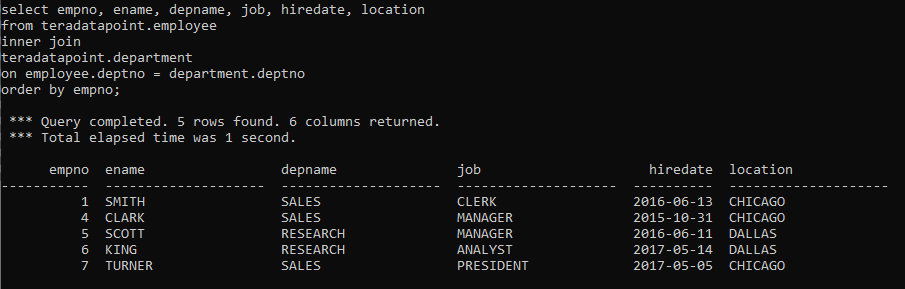
Employee 2 and 3 are not included in the resultset as it does not have the matching records in the department table.
Outer Join
Outer join can be three types.
- Left Outer Join – returns all the records from the left table and only the matching records from the right table.
- Right Outer Join – returns all the records from the right table and only the matching records from the left table.
- Full Outer Join – It combines the results from both the left outer and right outer. It returns both matching and non-matching rows from the join tables.
Outer Join syntax
Select column1, column2, ..., columnN
from DatabaseName.TableName1
LEFT OUTER JOIN/RIGHT OUTER JOIN/FULL OUTER JOIN
DatabaseName.Tablename2
on column1=column2
where condition;
Outer Join Example
Left Outer Join
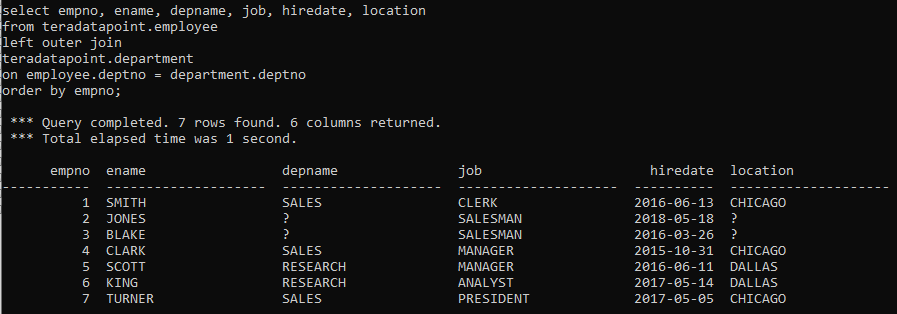
The following query returns all the records from the left table i.e. from the employee table even the matching records are not present in the right table i.e. department table.
select empno, ename, depname, job, hiredate, location
from teradatapoint.employee
left outer join
teradatapoint.department
on employee.deptno = department.deptno
order by empno;
After executing the above query, it returns the below result.
Right Outer Join
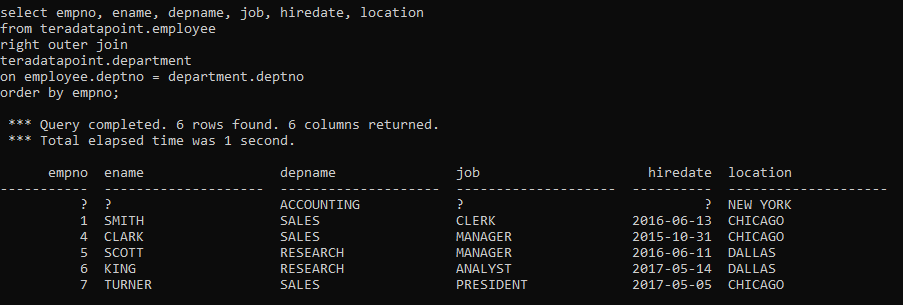
The following query returns all the records from the right table i.e. department table even the matching records are not present in the left table i.e. from the employee table.
select empno, ename, depname, job, hiredate, location
from teradatapoint.employee
right outer join
teradatapoint.department
on employee.deptno = department.deptno
order by empno;
After executing the above query, it returns the below result.
Full Outer Join
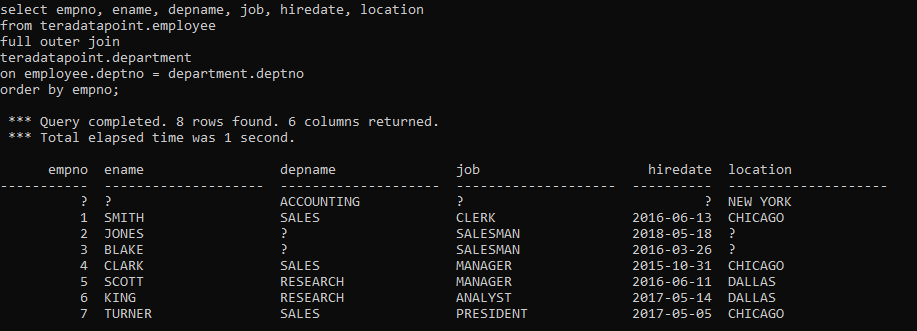
The following join query returns both the matching and non-matching records from the employee and department table.
select empno, ename, depname, job, hiredate, location
from teradatapoint.employee
full outer join
teradatapoint.department
on employee.deptno = department.deptno
order by empno;
When the above query executes, it returns the following result.
CROSS JOIN
Cross join joins every row from the left table to every row from the right table.
Cross join Syntax
Following is the syntax of cross join.
Select column1, column2, ..., columnN
from DatabaseName.TableName1
CROSS JOIN
DatabaseName.Tablename2
where condition;
Cross Join Example
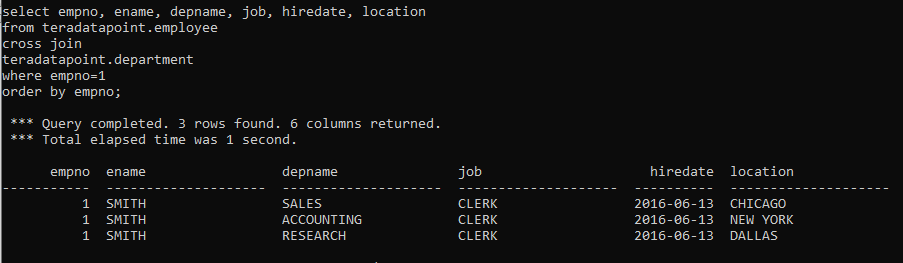
The following query is an example of the cross join in Teradata.
select empno, ename, depname, job, hiredate, location
from teradatapoint.employee
cross join
teradatapoint.department
where empno=1
order by empno;
When the above query is executed, it produces the following output. Employee 1 from the employee table is joined with every record from the department table.
Post Views: 11,058